Author: jonathan_49
Facebook Hacked How to Fix
If you’ve had your Facebook profile hacked here are four links to look at to help you get it back.
https://m.facebook.com/hacked
https://m.facebook.com/login/identify
https://m.facebook.com/help/contact/183000765122339
https://m.facebook.com/support/forms/flow_view?id=357439354283890
Plus there are some helpful links here:
Recording the wonderful voice of Sir David Suchet
It was lovely to record Sir David Suchet at Sounds Visual in Bath, narrating ‘The Pilgrims Way to Britain’s Great Cathedrals – a fascinating new three part TV series from Off the Rails Australasia, produced by Peter Beveridge – coming soon! Check out the trailer.
The Pilgrims Way To Britains Great Cathedrals from Off The Rails Australasia on Vimeo.
https://cleanfeed.net/ made the process of patching in the producer from Australia to direct, a breeze. And no expensive ISDN call charges! I used a Neumann U87 microphone which seems to work very well with Sir David’s voice.
Producing a polished professional broadcast voiceover sound using PSP Infinistrip
This video takes a quick look at how to add a bit of polish to a voiceover with the PSP Infinistrip plugin to make it sound crisper, richer and more pleasing to the ear.
Voiceover by Jono Slatter British Voiceover https://www.jonoslatter.co.uk Original voiceover recorded dry in booth with Neumann U87 mic.
Try a demo of the PSP Infinistrip Plugin https://www.pspaudioware.com/products/psp-infinistrip Review of Infinistrip in
Sound on Sound https://www.soundonsound.com/reviews/psp-infinistrip
Force WiFi Calling on your Android Phone
If you have poor 3g/4g mobile network coverage in say your office – it makes sense to use WiFi calling for an uninterrupted calling experience. But how do you force your phone to use WiFi and not try and use the mobile network?
On Android:
- Phone Settings – Call Settings – make sure WiFi calling is enabled.
- Put phone into Airplane Mode (this will turn Wifi off)
- Turn Wifi back on
Then just remember to turn airplane mode off before you leave the office!
Installing the East West Quantum Leap Symphonic Orchestra from DVDs
Recently I lost a media drive and along with it the samples and instruments for my East West Platinum Symphonic Orchestra virtual instrument.
My player was still all there as it resides on the main Mac drive in the applications folder.

To re-install the instruments and samples from the 28! DVDs this is what did:
- Create a folder on my media drive for the samples
- Insert Disc 1 but don’t run the installer (this seems to try and install everything on the internal Mac drive) but copy the library folder – in my case Platinum and Platinum Plus – to the folder I created in my media drive. This installs the instruments and creates the samples folder.
- Once that is complete insert Disc 2 – open the ‘_Data folder’ and run the installer – select the media drive AND don’t forget to choose the library folder copied over from disc 1. Continue and install.
- Once complete do the same as for Disc 2 on the remaining discs…in my case 28…
Getting Fibre to the Premises and moving to VOIP phones…
After years of putting up with unreliable broadband service and shoddy support from TalkTalk, I took the plunge and decided to ditch them and get fibre straight into the premises (FTTP) from a company called Aquiss.net.
The thing about FTTP is that it doesn’t use the old copper cable that was previously carrying the landline telephone calls and broadband service. This left me wondering what to do about the landline, as I still think for a business a landline suggests you have a building, a geographic location – so it builds trust for some people.
With that in mind, I was wondering what the best way would be to affordably keep your landline number… You could just keep your old broadband supplier – maybe go onto their lowest tariff – and that way you would have a backup internet connection if the fibre went off. Or just rent a buisness line – but those are quite expensive options.
I discussed this with Aquiss who were incredibly knowledgeable and helpful – and what a refreshing change. Their suggestion was to port the landline number to a VOIP telephone service provider. Well this was all new to me but once I had taken a look at the provider they recommended, VOIPFONE, it started to make sense. But would it work? All my landline calls get diverted to my mobile – so it’s important.
It costs £20 + vat to ‘port’ your landline number to VOIPFONE – this also has the effect of telling your current supplier that you wish to terminate your contract or service related to that number. I was out of contract with TalkTalk so there were no issues. Just endless messages from TalkTalk asking me to stay…the last letter was titled: ‘Is this really goodbye…?’ Err yes. If they had shown the same level of concern every time the broadband failed then maybe I would have reconsidered. Oh the joy of not having to deal with their rubbish customer service ever again.
Once your number has ported, you can get into your account page at VOIPFONE and set up things like call divert. So I’m now sitting pretty with speedy FTTP uploads and downloads and I can control where my inbound landline calls go to, or even set up fancy IVR systems, music on hold, auto-attendants…the possibilities are endless.
Should have done it ages ago.
And of course if you need any auto-attendant, answerphone, IVR or messages on hold recordings made- Sounds Visual specialises in supplying professional voice recordings for company telephones systems around the UK and beyond. To find out more call 01225 470011 – or email jono@soundsvisual.com
LINKS
Fibre to the premises: https://www.aquiss.net/
Port your landline to VOIP: https://www.voipfone.co.uk/

Setting up port forwarding for Source Connect on TP Link Router
Source Connect (not to be confused with Source Connect Now) works best if you set up Port Forwarding on your router.
I have just replaced our router with a TP Link AX50 and this is how I configured it.
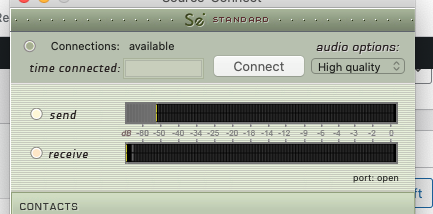
If you don’t have port forwarding setup correctly, when you have Source Connect running, below the meters you will see it says port: UPnP/PMP – and what you want it to be saying is ‘port open’.

So to set it up you need to do 2 things: 1. Assign a static IP address to the machine running Source Connect. 2 Set up Port Forwarding.
Log into your router. (usually 192.168.0.1)
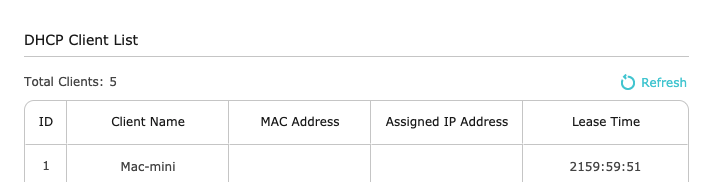
Click on ADVANCED and then NETWORK in the left pane and then DHCP SERVER. In the DHCP client list make a note of the MAC Address and IP of your SC machine.

Then in the section above called ADDRESS RESERVATION – click ADD. And add the Mac Address and IP and enable it and save.
NEXT PORT FORWARDING
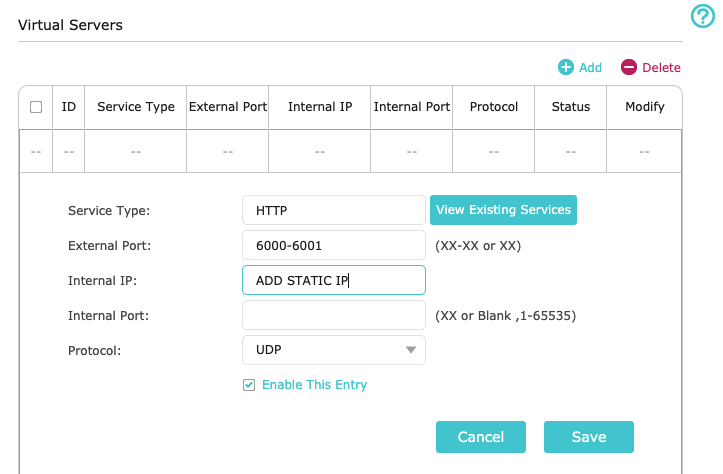
Click on NAT FORWARDING in the left pane and then VIRTUAL SERVERS. Click ADD. For service type choose HTTP, External Port 6000-6001, Add the static IP you just setup, leave internal port blank and make sure you select UDP as the protocol. SAVE. Log out and fire up Source Connect.

I’m no expert on this, so advise caustion before playing with the settings of your router, but this worked for me.
If it’s working correctly, when you open Source Connect – below the meters you should see: PORT OPEN.

The Voiceover Booth at Sounds Visual
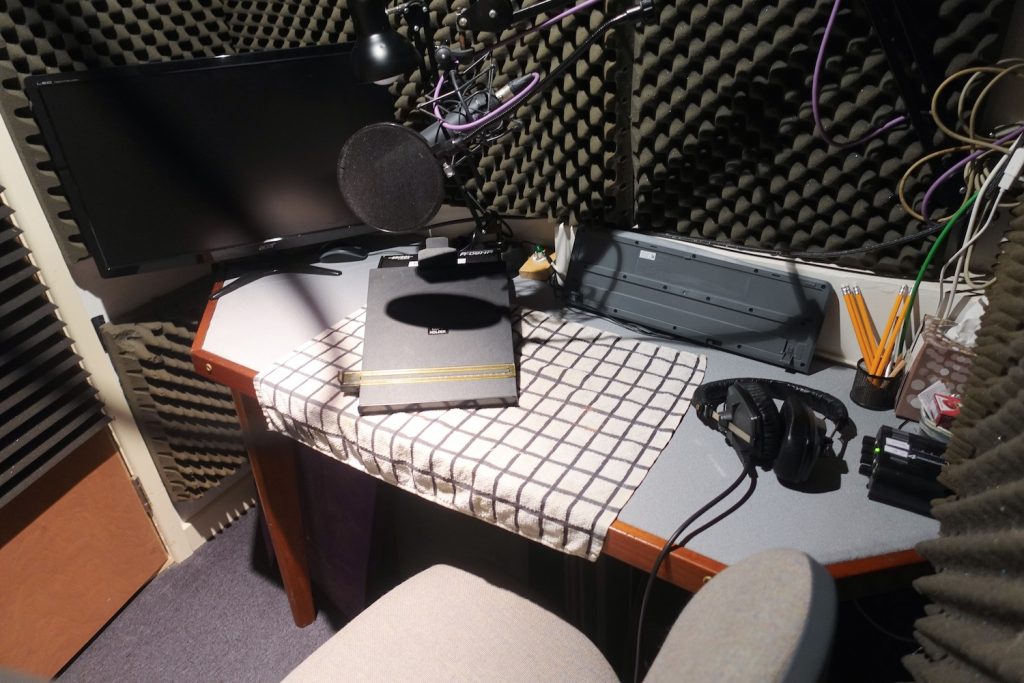
The voiceover booth at Sounds Visual rigged with:
- Beyerdynamic DT150 headphones
- Neumann U87ai microphone
- HD monitor for picture work and for self control of Logic
- Canford Audio Table
- Lectern
- Popshield
- Headphone Amplifier

Video of the unique sound of Busy Bees in the English Summer
A video of the sound effect of an English Summer’s day with lots of bees busy pollinating. Audio recorded on Sennheiser 416 and Sound Devices MixPre-3.
To purchase this sound and for more sounds please check out YoPo Sound Effects here
Buy this sound on Pond5